
Giving an AI agent a read-only database login takes about five minutes. Create the account, grant
SELECT, paste the connection string into the agent’s config. I nearly did exactly that for my
team.
Then I pictured the first query. A teammate asks their agent to check product descriptions, and
the agent, being thorough, looks around the schema first. The customer table sits in the same
database. Names, phone numbers and email addresses are all readable, and one curious SELECT *
puts them in a model’s context and in a chat log on someone’s laptop.
Read-only stops an agent from breaking things. It does nothing about what the agent sees.
This is part 1 of a series on Prism, the gateway I built so my teammates’ agents can read company data without seeing personal data, and without being able to change anything.
What my teammates should be able to do
The people I have in mind aren’t developers. They work in operations, finance, marketing and merchandising, and more and more of them have an AI agent open all day. Two examples of what they could do if that agent could reach our data:
- Review product content with an agent. Today a reviewer opens products one at a time in an admin screen and reads each one. An agent could read all of them, flag the ones that look wrong, and discuss them with the reviewer.
- Explore a supplier’s catalogue with an agent. Today that means logging in to each supplier’s portal and clicking through products one by one. An agent could pull the catalogue through the supplier’s API and compare it with what we already sell.
Right now, anything beyond the admin screens turns into a request to a developer, and that developer is often me.
Two shortcuts, two problems
Shortcut one: a read-only database account. It has the problem I started with: products and customers live in the same database, so an account that can read one can read the other. It also can’t tell people apart. A few colleagues are allowed to look up a customer’s details as part of their job, and most aren’t. One shared account gives everyone the same view.
Shortcut two: share the supplier’s API key. Suppliers generally issue one key per integration, not a read-only one. The key that lists products can also create a booking and cancel one. An agent that misreads an instruction, or invents a booking reference that happens to exist, is one HTTP call away from a real cancellation. And once the key is in an agent’s config, it’s also in shell history, in conversation logs, and on every laptop that has a copy.
Both shortcuts work on day one. Both fail the first time an agent does something reasonable that nobody expected.
Three promises
Before writing code I wrote down what the gateway had to guarantee:
- The agent never holds a real credential. No database password and no supplier key. It holds one token that identifies a person, and nothing else.
- The agent never receives data its person isn’t allowed to see. The check happens before the data leaves, not in a prompt asking the model to look away.
- The agent can’t change anything. It can’t write to the database, and it can’t send a supplier a request that changes state.
What these have in common is that none of them depends on the model behaving. In an earlier post I described an agent that ignored a rule it had been given, and the fix was to take the tool away. A rule in a prompt is a request. I wanted these three to hold even if the model ignored every instruction it had.
“No writes” is a decision
The third promise is the one that needed an actual decision. I looked at three options:
- Ban writes completely.
- Allow specific writes for specific people. That needs a permission model for writes, a way to make retries safe, and a recovery procedure for mistakes.
- Allow writes after a human approves each one. That needs an approval screen, and the agent sits idle while it waits.
I chose the ban, and three days later I nearly took it back. The first supplier I planned to connect turned out to be one where most of the calls our own systems make are writes: creating listings, updating prices, confirming and cancelling bookings. If the main use of an API is writing, a read-only gateway in front of it looks pointless.
So I went back to the first project we actually wanted to run through it, which was comparing the supplier’s records with ours. Every call it needed was a lookup. The ban stayed.
I’m glad it did. Among that supplier’s write calls, some change what customers see on a sales page straight away, and one cancels a payment. With writes banned, I don’t have to design a recovery plan for those accidents, because the request never leaves the gateway.
The cost is real: any automation that needs to write can’t use Prism. If that need turns up, it gets its own decision, with the approval and recovery design it deserves.
The shape of it
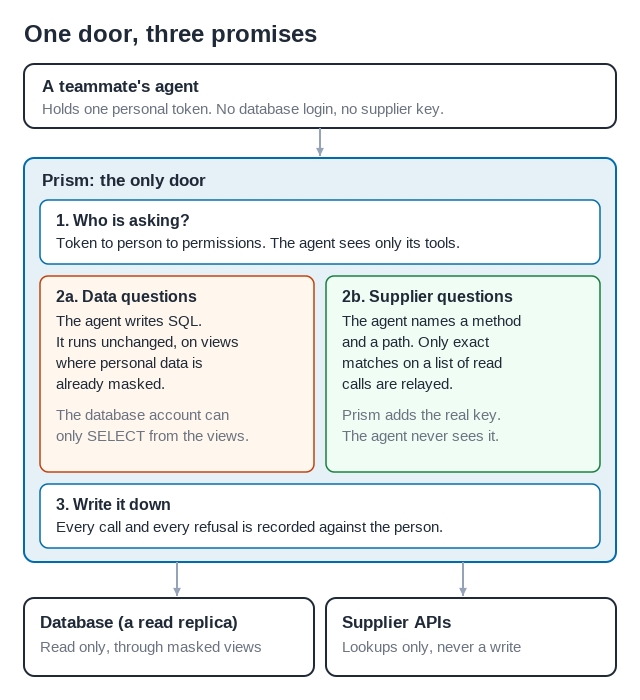
Prism is one server that speaks the Model Context Protocol (MCP), so a teammate adds it to their agent once. What the agent sees after that depends on who its person is:
- Who is asking? People sign in to a small portal with their company account and create a personal token for their agent. Every request maps that token to a person and that person’s permissions. The agent’s tool list only shows what the token can do.
- Data questions. The agent writes ordinary SQL and Prism runs it without changing a character. The masking happens inside the database: the agent’s queries run against views where personal data is already masked, using a database account that can’t reach the real tables.
- Supplier questions. The agent names a method and a path from the supplier’s API. Prism holds the real key, adds the authentication itself, and relays the call only if it exactly matches a list of lookups I checked against the supplier’s documentation. Anything else is refused before it leaves.
- A record. Every call is recorded against the person, and so is every refusal.
Each layer assumes the one before it has a bug. On the database side, the last line of defence isn’t my code at all. It’s the database’s own permission system, which has had far more people trying to break it than anything I wrote in the last six weeks.
From the agent’s side
Here’s an illustration of a session. The names and paths are made up; the masking and the refusal are how Prism behaves.
A reviewer asks for the bookings on one product from last week. The agent lists the tables, reads
the columns, and runs a query. The rows come back with booking IDs, dates and amounts intact. The
customer name column says K** and the email column says ***. The agent didn’t ask for masked
data and didn’t have to know about it. For this person, that’s simply what the table contains.
Later the agent decides one of those bookings should be cancelled and tries to call the supplier:
POST /bookings/8841/cancel

Refused: this method and path are not on the allowlist.
Only lookup endpoints can be used through this gateway.
The supplier never receives the request. The refusal is written for the model to read, so the agent can tell the reviewer that cancelling isn’t something it can do from here.
Where this stands
I started in mid-October, and I’ve been using Prism against live data since about a week after that. So far the users are me and my own agents, including kenny, which reads current data through it to answer teammates’ questions. A shared instance for the team went up a few days ago, and opening it to more people is the next step.
So this series is about the design and the build, not about adoption. I’ll write about adoption when there’s something to measure.
What I’d tell someone starting the same thing
- Read-only limits damage, not exposure. Ask what the agent can see before asking what it can break.
- Write the promises first. Three sentences I could test were more useful than any architecture diagram.
- Don’t let a promise depend on the model. If a guarantee lives in a prompt, it’s a preference.
- Decide about writes on purpose. “No writes” removed a whole class of accident and a lot of design work. Check it against a real first project before you give it up.
- Keep the key on your side of the door. An agent can’t leak or misuse a credential it never had.
The series
- A read-only account is not a safe account (this post)
- I didn’t write a SQL parser
- The API key can cancel bookings
- I designed it for curl. Agents needed a tool
- Who asked, and what did they get?
Next: the masking. I had three ways to keep personal data away from an agent that writes its own SQL, and the obvious one was a parser.
If your team’s agents can already reach your data, what can they see that the person using them can’t?