
My first idea for the data side of Prism fit in one sentence: make a copy of the customer table with the personal columns masked, and let agents read only the copy.
That sentence didn’t survive the design. What replaced it has no masking code in the gateway at all, and no SQL parser either. The gateway passes the agent’s query to the database without changing a character.
This is part 2 of a series on Prism, the gateway I built so my teammates’ AI agents can read company data without seeing personal data. Part 1 covered why a read-only account isn’t enough. This part is about the masking.
Three ways to open a database to an agent
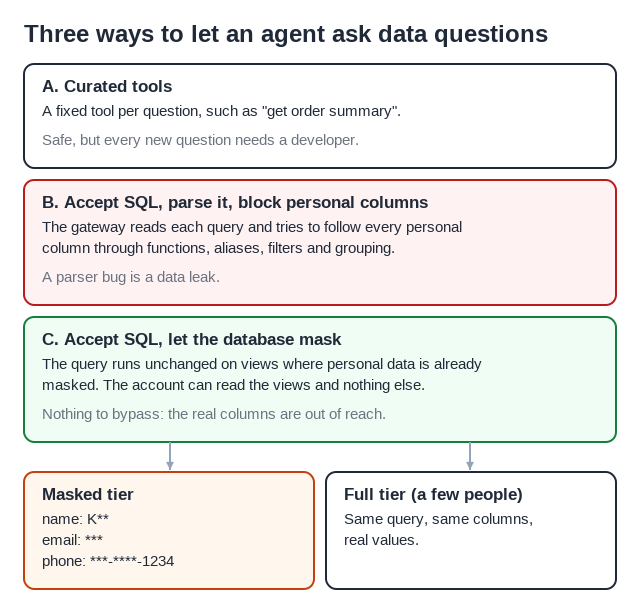
Option A: curated tools. Build a tool per question, like “get the summary of an order”. The gateway knows exactly what leaves, so masking is easy. But the people this is for do analysis, and analysis questions never repeat. Every new question would need a developer to add a tool, which is the queue I was trying to remove.
Option B: accept SQL and police it. Parse each query, work out which columns it touches, and block or rewrite the personal ones. This is the obvious design, and I got as far as listing what the parser would have to catch:
-- a function hides the column name from a naive check
SELECT LOWER(email) AS e FROM customers;

-- nothing personal is selected, but the filter leaks it one guess at a time
SELECT COUNT(*) FROM customers WHERE phone LIKE '0412 3%';

-- the grouping key is the personal data
SELECT email, COUNT(*) FROM orders GROUP BY email;
And then subqueries, unions, views, window functions, and whatever the next database release adds. Each one is a rule I’d have to get right, and each rule I got wrong would be silent. In the decision record I wrote: a parser bug is a data leak.
Option C: accept SQL and let the database do the masking. If the account the query runs as can’t reach the real columns at all, there’s nothing for a clever query to get around. I chose this one.
How it works
For each table agents may read, there’s a view with the same name in a separate schema. The view selects the safe columns as they are and replaces the personal ones with masked expressions. Simplified, with made-up names:
CREATE VIEW masked.customers AS
SELECT id,
       CONCAT(LEFT(name, 1), '**') AS name,
       '***'                       AS email,
       created_at
FROM app.customers;
Three database features do the rest:
- The reader account can only
SELECTfrom the schema of views. It has no permission on the real tables, so naming them directly is a permission error from the database, not from my code. - The views run with their owner’s permissions, and the owner is a locked account that nobody can log in as. It’s the only account that can read the real tables, and only through the view definitions.
- The reader can’t read the view definitions, so the agent can’t see how a value was masked.
Now run the three queries from option B. LOWER(email) returns the lowercase of ***. The LIKE
filter is compared against the masked value and matches nothing. The GROUP BY puts every row under ***.
None of them needed a rule.
The gateway’s job shrank to three things: pick the right account for the person, open a fresh connection for every request so nothing leaks between sessions, and stop runaway queries. One of my tests reads the database’s own query log and checks that what arrived is byte-for-byte what the agent sent.
The copy table I didn’t build
Back to the first idea. To keep a masked copy of a table current, you need triggers on the original. Listing what that meant ended it:
- If a trigger fails, the original write fails with it. A bug in a tool built for analysts could break customer sign-ups.
- Every write happens twice.
- Some changes don’t fire triggers at all, such as rows removed by a cascading delete, so the copy drifts without anyone noticing.
A view has none of these problems. It copies nothing, it can’t break a write, and it’s always current. For a simple one-table view the database merges it into the query, so the original indexes still apply. I compared query plans against the real tables to be sure.
Same SQL, same shape
A few colleagues are allowed to see customer details. For them there’s a second schema of views with the real values, and a second account.
The two schemas have the same view names and the same columns in the same order. The gateway
connects as one account or the other, depending on the person. So the agent writes the same SQL
either way and doesn’t need to know which tier it’s on, and SELECT * has the same shape for
everyone. Columns holding secrets, like password hashes, exist in neither.
If the gateway is ever unsure which tier applies, it uses the masked one. The only dangerous mistake is in one direction, so the default points the other way.
Unclassified means invisible
The views are generated from a classification file: for each table, each column is marked as pass, mask, or hide. The rule that matters most is what happens to things nobody classified:
- A table that isn’t in the file gets no view. To the agent, it doesn’t exist.
- A column that isn’t in the file is left out of the view.
So when a developer adds a column next month, agents can’t see it until someone decides what it is. That’s an inconvenience, and it’s on the safe side.
The database has hundreds of tables and thousands of columns, far too many to classify by hand in one sitting. I classified the core tables myself and wrote a classifier for the rest. It looks only at column names and types, never at the data, and it follows one principle: when wrong, mask more. Anything that looks like a contact detail, a name, an address or free text written by a person gets masked. Anything that looks like a credential gets hidden. Tables that hold secrets inside their values are excluded entirely.
Classifying by name has a blind spot: an innocently named column can hold text a customer typed. So every automatic decision is marked as automatic in the file, which tells a reviewer exactly where to look.
The assumption that was wrong
Prism reads from a replica of the database, not the primary. I’d assumed the replica was read-only, and I’d written that assumption into three design documents. In one it was a reason writes were impossible. In another it decided where the views had to be created.
About a week in, I checked. It wasn’t read-only.
Two things changed. First, I took “the replica is read-only” out of the argument for the no-writes promise. What stops writes is the reader account’s permissions, plus a read-only transaction on every connection as a second layer. Second, the design got simpler. I’d planned to create the views on the primary and let them replicate, which meant schema changes on the production primary. Now I could create them on the replica only, in schemas that don’t exist on the primary, and leave the primary alone.
The lesson I took from it: a property you didn’t verify isn’t a layer of defence.
What it costs
- No searching or joining on masked columns. The comparison runs against the masked value, so it finds nothing. The server’s instructions tell agents to join on IDs instead.
- No counting distinct customers by email or phone. Every masked value looks the same.
- Heavy queries can only be bounded from outside. Since I don’t touch the SQL, I can’t add a
LIMIT. The gateway sets a time limit on the session, stops reading at a row cap, and limits how many queries one person can run at once. - Classification is now part of every schema change. The work moved from writing tools to maintaining a file. I think that’s the right trade, but it is work.
What I’d tell someone building one
- Don’t police a language you didn’t write. If the control depends on understanding every query, the first query you misunderstand is a leak.
- Put the boundary where the data lives. Database permissions have been attacked for decades. Your new parser hasn’t.
- Default to invisible. New tables and columns should need a decision before an agent can see them.
- When a classifier is wrong, make it wrong in the safe direction, and mark what it decided.
- Verify the properties you’re relying on. I built on “read-only” for a week before checking it.
The series
- A read-only account is not a safe account
- I didn’t write a SQL parser (this post)
- The API key can cancel bookings
- I designed it for curl. Agents needed a tool
- Who asked, and what did they get?
Next: the supplier APIs, where there’s no database permission system to lean on and the key I hold can cancel a booking.
Where does the boundary sit in your setup: in code that inspects the request, or in the system that owns the data?