
In mid-October I wrote a decision record about how agents would reach supplier APIs through Prism. I listed three options and chose a transparent HTTP proxy. One of the options I rejected was a single generic tool on the MCP server. The reason I gave: it was an unnecessary layer, because the agents could already call HTTP directly.
Six weeks later I deleted the proxy and built that tool. The new decision record says the earlier reasoning turned out to be backwards.
This is part 4 of a series on Prism, the gateway I built so my teammates’ AI agents can read company data safely. Part 3 covered the checks every supplier call goes through. Those checks survived. The way agents reach them didn’t.
Why the proxy looked right
The idea was simple, and it was mine. An agent calls the supplier’s API exactly as the supplier documents it, except for two things: the base URL points at Prism, and the key isn’t the real one. Prism checks the request, swaps in the real key, and relays it.
Two things made it attractive:
- The agent’s knowledge of the supplier’s documentation applies unchanged. So do curl and the supplier’s SDK.
- Opening a new endpoint is one line of configuration.
It came with a second idea. The supplier’s protocol has a slot where the key goes, and something had to go in it. I issued a stand-in key per person, per supplier. A call needed both the person’s Prism token and their stand-in key, so leaking one wasn’t enough to make a call. I recorded that as a benefit: two factors.
What six weeks of use showed
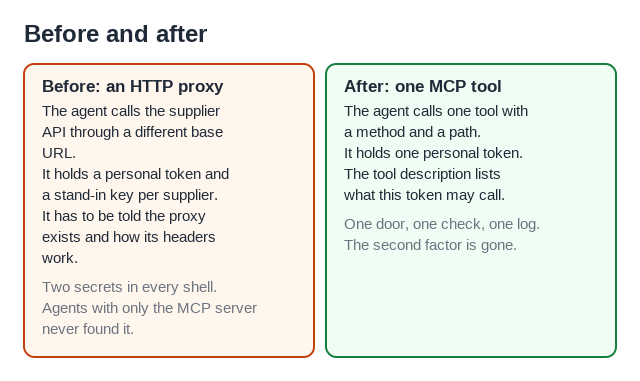
The costs all landed on the agent’s side.
- Two secrets in every shell. Each agent needed the token and a stand-in key as environment variables, and they ended up in shell history and conversation logs. They weren’t real supplier keys, but they were credentials, and they were everywhere.
- Rules that lived nowhere. The agent had to know the base URL and which header carried what. None of that was discoverable. Someone had to tell it.
- Agents didn’t know the proxy existed. An agent with only the MCP server attached could see the database tools and had no idea there was a supplier relay next door. My workaround was a paragraph in the MCP server’s instructions explaining how to call the HTTP proxy.
That last one settled it. I was using one interface to document the other. And the interface doing the documenting already authenticated the person, already described what could be called through its tool list, and already wrote the audit log. The HTTP proxy was the extra layer.
One tool, one token
The replacement is one tool on the same MCP server. It takes a supplier, a method, a path, a query and a body. Everything from part 3 carried over unchanged: the exact-match list, the refused paths, the quotas.
The stand-in keys went completely: the table, the page in the portal, the admin screens, the error code. I considered keeping both doors, HTTP for bulk work and the tool for everything else. But two doors means the same checks maintained twice, and as long as HTTP stayed, the stand-in keys stayed with it.
What I gave up:
- The second factor. One leaked token now opens supplier lookups within that token’s permissions. I accepted it because the supplier side is lookups only, a token can be issued with a narrow scope, and revoking one takes effect quickly. The database side had worked with a token alone from the start.
- curl and SDKs. Paths still follow the supplier’s spec, so the knowledge transfers. The tooling doesn’t.
- Big responses in one piece. A large response comes back in pages, and each page calls the supplier again. That uses quota, and the pages can disagree if the data changes in between.
Designing for a model as the user
The bigger lesson was about who the user is. I’d designed the proxy for a developer with a terminal. The actual user is a model reading a tool list. Once I took that seriously, several things changed.
The tool list is the permission screen. The supplier tool is only registered if the token has a supplier permission. Its description is generated from the configuration: which environments this token can use, and every method and path that’s allowed. Lookups that need a permission the token doesn’t have are marked as such. An agent can read what it’s able to do before trying anything.
It says where the spec is, and not to guess. Prism doesn’t serve the supplier’s documentation. The tool description says where to find it, and tells the agent to ask its person for the file if it can’t read it, instead of guessing at paths.
Refusals are written for the reader. A supplier’s own error comes back as a normal result, because the agent should see what the supplier said. Only Prism’s refusals are errors, and each one names what was blocked, what is allowed instead, and when to retry if that applies. A model that gets “forbidden” tries variations. A model that gets a reason stops and tells its person.
Result size follows the client. The coding agent my team uses saves very large tool results to a file on disk and gives the model the file’s path. That’s sensible, until the result is customer data for someone allowed to see it. Then the data sits in a file on a laptop. So I set Prism’s result cap below that threshold. A truncated result says it was truncated and suggests aggregating or narrowing the query. I also stopped sending a structured copy of each result alongside the text, because it doubled the size.
Every error says which Prism is speaking. I run more than one instance: one for development, one for my own use, and now a shared one. I once went round in circles on an authentication error because a token from one instance was registered against another, and nothing in the error said so. Now an authentication error names the instance that refused and the address of its portal, and each instance appears under its own name in the agent’s tool list.
What I got wrong, exactly
I don’t think the proxy was a careless choice. For a developer it’s the better interface.
My mistake was the sentence “the agents can call HTTP directly”. It’s true, and it measures the wrong thing. An agent can call anything. What matters is whether it can find out what exists, what it’s allowed to do, and why something failed, without a person explaining it first. MCP gives a server a place to say all of that. An HTTP endpoint doesn’t have one.
What I’d tell someone building one
- Ask who reads your interface. If it’s a model, discoverability is the feature.
- Watch for one interface documenting another. That’s the sign the second one shouldn’t exist.
- Count the secrets on the client. Each one ends up in a history file sooner or later.
- Write down what a simplification costs. Dropping the second factor was a real loss, and the decision record says so.
- Write refusals as instructions. Say what happened, what’s allowed, and when to come back.
- Learn what the client does with your output. Its handling of large results became part of my privacy design.
The series
- A read-only account is not a safe account
- I didn’t write a SQL parser
- The API key can cancel bookings
- I designed it for curl. Agents needed a tool (this post)
- Who asked, and what did they get?
Next, the last part: tying every call to a person, and keeping a record that doesn’t become a second copy of the data I just masked.
Have you built something for developers that an agent ended up using? What did the agent need that the developer didn’t?